Todays Silverlight 2 presentation

I had a silverlight breakfast-presentation named "Let me show you how easy it is to use Silverlight!" for Avanade today, where I coverd a lot of the basic topics in Silverlight, some Balder3D and Silverlight 3.
The response and feedback was good, and it looked like the audience enjoyed the presentation, so, thanks for showing up.
 
My next presentation is the Game Camp event at NITH next week, so be sure to check this out and take a visit if you’r in Oslo. There I will cover Shader Programming, and Thomas Beswick will cover some topics within Game Design( see previous post ).
Posted in Silverlight | Leave a comment

Game Camp Event: 13.05.2009

 
There will be a new Game Camp event at NITH, Oslo 13.05.2009!
 
The event starts at 18:00 and lasts to about 21:30, but feel free to attend to whatever session you like!
 
Agenda:
18:00 – 18:30
  Mingling
18:30 – 19:30
  XNA Shader Programming – Petri Wilhelmsen
19:30 – 20:00
  Pause
20:00 – 21:00
  Game Design – Thomas Beswick ( Winner of best game concept, NGA 2009 )
21:00 – 21:30
  Demo on Grill Simulator 360, a game for XBox 360 created using XNA by Dark Codex STudios


Speakers:

  • Petri Wilhelmsen( me ) from Avanade will talk about XNA and Shader programming using HLSL/XNA. This session will start with the basics and move in to more advanced topics.
  • Thomas Beswick from OPIM, Hamar will talk about Game Design/tips and tricks when designing your own game.
  • Dark Codex: Will do a presentation of their new XBox 360 game, Grill Simulator 360!
 
 
How to get there:
Norges Informasjonsteknologiske høgskole (NITH)
Schweigaards gate 14, 0185 Oslo
Norway
 
 
Feel free to contact me if you got any questions!
Posted in Game Camp | Leave a comment

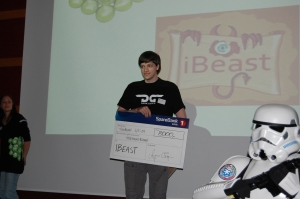
iBeast, winner of NGA09

iBeast is an iPhone/iPod Touch game where the player creates a Beast and trains it in various stats. For example a memory game will train intelligence, and a balance game using accelerometer will train the beast’s dexterity. The player can also send his beast to arena battles to fight other beasts, and challenge friends beasts to battle. The game might also be considered to be released on HTC/Windows Mobile.

This concept won the best concept prize at Norwegian Game Awards 2009, congratulations!

Posted in Game programming | 2 Comments

Dark Codex wins best game-concept at Norwegian Game Awards

iBeast, a game concept by Dark Codex won the Best Game Concept competition at Norwegian Game Awards 09!
Good work guys!
 
iBeast is a game for iPod and iPhone.
 
Pictures and more information will be added tomorrow!
Posted in Game programming | 1 Comment

XNA Shader Programming – Tutorial 17, Point light and self-shadowing

XNA Shader Programming
Tutorial 17, Point light + Self-Shadowing
 
Hi, and welcome to Tutorial 17 of the XNA Shader Programming tutorial!
Today we are going to build on the Normal Mapping shader we made in tutorial 4. You don’t need to know Normal mapping before making a point light, so if you just want to know how to implement a point light, feel free to continue reading!
This tutorial will only explain what a point light is, and how to implement it so you won’t get distracted by the normal map. The algorithm used here is hen added to the normal mapping shader, or whatever shader you like( considering you learned the technique 😉 ).
 
It’s not really hard, as long as you understand tutorial 1,2 and 3. So if you have not done these three, you should do them before jumping on this one.
 
Source and executable can be found on the bottom of the article!
 
BTW Images will be remade once I get my softwre ( other than paint ) to work again, sorry for this.
 
Point light
Point lights( also named Omni light in some rendering tools ) is a light source where the light spreds out in every direction from a point in 3D space.
                                                                                                Fig 17.1
 
Unlike any of our previous directional lights, the point light can have a range, making it’s light rays die out after a certrain distance. This is called the attenuation factor:
 

                                                                                         Fig 17.2
 
If we subract the dot product of V1=L/r and V2=L/r ( V1.V2 ) from 1, we will get the attenution factor.
We want all objects to only have ambient light when outside of the range from our point light, so our final light equation for our point light looks like this:
 I = A + Diffuse*Specular*attenuation
 
Self shadowing
One problem we have in oulight equation is that we get some artifacts from our diffuse and specular light calculation. Pixels get lit when the light vector and the view vector is pointing the opposite directions. Also, when the light gets too close to the surface, we get artifacts as well.
A solution to this is to implement something called Self-Shadowing, that prevents pixels that should not be lit, to be lit.
The self-shadowing factor will be zero, or close to zero when the geometry is occluded/should not be lit, and above zero if the surface/pixel is within the conditions to be lit.
So, how do we do this? Yes, you guessed right. The dot product between the Normal of the surface and the Light direction:
S = saturate( N.L );
 
But the threshold is quite low here, so by multiplying this by 4.0, we will get the right threshold [Frazier].
 
Given this, we can now multiply the specular and diffuse light calculation with S, making the diffuse and specular light to be zero when S is zero!
This gives us a new light equation:
 I = A + S(Diffuse*Specular*attenuation)
 
This can be optimized( try this on your own, as a lesson ;:) ), by only calculating diffuse and specular if S is above zero, else the diffuse and specular component should be set to zero: if( S > 0) { calculate.. }.
 
But.. you might be wondering about bump mapping? Can’t the normal from a bump map still look in the direction of the light, even though the surface( physically  ) is not? Yes.. it can, and we need to prevent this!
When using normalmapping, we are in tangent space. This allows us to use the Z component of our light vector, since this equals to N.L when the light is in tangent space.
This leads us to the following formula:
S = 4 * LightDirection.z;
 
 
Implementing the shader
First of all, we need to declare a light range:
float LightRange;
 
Then, in our vertex shader, we can calulate the light, putting the attenuation in our lights w-component and putting the light direction vector in L:
// calculate distance to light in world space
float3 L = vec,LightPos – PosWorld;
// Transform light to tangent space
Out.Light.xyz = normalize(mul(worldToTangentSpace, L));  // L, light
// Add range to the light, attenuation
Out.Light.w = saturate( 1 – dot(L / LightRange, L / LightRange));
 
Whats left now is to use the attenuation value in our light equation and apply self-shadowing, which is done in the pixel shader:
float Shadow = saturate(4.0 * LightDir.z);
….
….
return 0.2 * Color + Shadow*((Color * D  * LightColor + S*LightColor) * (L.w)); 
 
As you can see, the point light ain’t very different from the directional lights we used before. 🙂 The self-shadowing value can also be used in our previous examples where a light is being used.
 
Using the shader
Nothing new here, apart from setting the light range and a light position instead of a light direction:
effect.Parameters["vecLightPos"].SetValue(vLightPosition);
effect.Parameters["LightRange"].SetValue(100.0f);
effect.Parameters["LightColor"].SetValue(vLightColor);
 
NOTE:
You might have noticed that I have not used effect.commitChanges(); in this code. If you are rendering many objects using this shader, you should add this code in the pass.Begin() part so the changed will get affected in the current pass, and not in the next pass. This should be done if you set any shader paramteres inside the pass.
 
Short and simple. If you got any questions or feedback, please leave a comment or send me an e-mail! 🙂


Posted in XNA Shader Tutorial | 4 Comments

Pseudodepth and lights in Balder

After a few hours in the world of Balder, I managed to fight the evil wizard of the Z-buffer and projection mapping for rendering sprites correctly. Or, at least I hope so!
I used the distance vector from origo( using the cameras local coordinate system ) to the sprite P in order to scale it correctly using a pseudodepth function: 2*NearPlane/P.z.
 
Also, I finished implementing the basic lights: directional light and omni lights. Both lights got support for ambient, diffuse and specular lights, including self-shadowing.
Posted in Balder3D | Leave a comment

An update on Balder!

Einar have done a great job on software rendering in balder, and have posted an update-post on the work that have been done there:
 
A good read for those of you who want to take a look at Balder!
 
I was working with the lights last week, and got a directional light, featuring ambient light, diffuse light and specular light. My next goal is to implement Omni( Point ) light and spotlights.
Also, some issues was found regarding correct perspective scaling on 2D sprites, but after speding some hours this other day and yesterday, I guess we are on the correct track here. 🙂
 
All in all, great progress this far and I’m really looking forward to release version 1.0!
 
 
For updates on Balder, follow Einar Ingebrigtsens blog, this blog, and www.codeplex.com/Balder.
 
Posted in Balder3D | 1 Comment

All tutorials now with videos

I have uploaded a video of each example programs on my tutorials!
 
These can be found on the bottom of each tutorial( if they are not working yet, they might still be processing )..
 
Anyway, it took a while so, enjoy 🙂
Posted in General | 1 Comment

Videos of the tutorial examples

I have recieved a few requests on a video for each tutorial, so one can see the result in action. So, based on this, I will use some time this evening to render a video for each tutorial and post them on the articles.
 
Posted in XNA | 4 Comments

Balder at alpha!

After a few coding-sessions last week on Balder, we are getting closer and closer to a release! We are currently at alpha, so get ready to see some real Balder action quite soon!
 
What is Balder?
 
I’m having a Silverlight presentation for Avanade on Silverlight this week, and wil spend a few minutes on showing balder, so if you work at Avanade, be sure to see this presentation 🙂
 
Also, for those of you who are writing articles for XNA, be sure to check out the Ziggyware Spring 2009 XNA Article Contest at http://www.ziggyware.com/news.php.
Posted in Uncategorized | 6 Comments