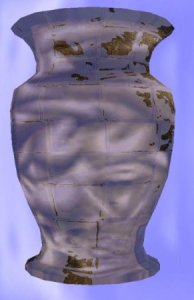
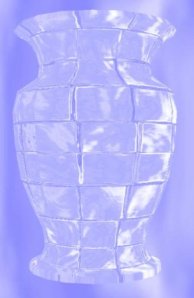
XNA RGB Refraction Shader

I implemented a HLSL shader in XNA during the past few days and i’m pretty satisfied with the outcome.
 
The shader takes a few parameters like the usual light position, normal map, cube map and so on, but the most important here is the two refraction indices describing how the light bends, using Snell’s law. There is also one parameter that can be set to true, that will make the light refract differently on each rgb channel.
 
I will share it with you on my XNA Shader Presentation at NITH sometime after the Easter, together with many small post-process shaders I have made recently( Radial Blur, Depth of Field, G.Blur, Sharpen, Emboss, B/W, Invert colors).
 
 
The mesh here is just a simple sphere I generated on the fly, but any loaded 3d model file can be used.
 
Posted in Graphics | Leave a comment

dare to be digital

If you happen to be a student and an XNA progammer, you should read more.
 
There is a competition at http://www.daretobedigital.com/ where a Norwegian team will participate. They got one position open for a programmer. This team was one of the 20. best teams in the game programming competition of Imageine Cup world wide, and I guess they will do great in this competition as well.
 
If you are interested, please contact me and I will introduce you to the team. 🙂
Posted in Uncategorized | Leave a comment

Functionality of Grill Simulator 360 is DONE!

( This screenshot is over 6months old )
 
I’m happy to announce that the functionality of Grill Simulator 360 is done.
 
There is still a lot to do with testing, bug fixing and game balancing, but no new functionality will be added to the game.
 
I think we will have a release ready in about one month. This is an XBox360 community game release, but a PC version of the game will be released shortly after.
Posted in Game programming | 1 Comment

Staying in Avanade

As many of you know, I was going to start in Objectware as a Microsoft consultant…
Well, changes in plans, I decided to take back my resignment from Avanade and continue working there. There are various reasons for this but that stays with me.
 
Anyway, I look forward for doing more work with Avanade and continue on the Telenor Way of Work project.
Posted in General | 1 Comment

Depth of Field

A while since last time. I have been pretty busy with work and graphics programming. Trying to make a nice demo for The Gathering, in April.
 
Also, next week is my final week in Avanade. I’m pretty exited on moving to a new company, but also a bit sad for leaving Avanade. Been two really great years on cool projects with great colleagues, esp. on the Telenor Way of Work project.
 
During the past weeks I finished the implementation of dynamic cube mapping, and I also managed to implement a pretty nice Depth of Field( DoF) effect.
My approach to the DoF effect was to render a scene to three textures, one normal texture, one depth texture and one downsampled texture( 1:4 ). I used a 2xGouraud blur shader on the downscaled texture to blur it nicely.
 
The effect is done in one post-process pixel shader, that combines the textures mentioned above. I use the depth texture and two paramteres: focus distance and focus range to calculate whats in focus and whats blurred; the result stored in a variable. Once I know this, i can mix the scene and the blured scene texture based on the variable to get the final DoF effect.
 
In this screenshot I have put the focus on the head burried in the sand, and you can see the hand and the sky is blured out.
Im quite happy with this effect as I can add it to any scene I want without having to build the scene around the effect.
Posted in Graphics | 1 Comment

Dynamic Environment Mapping

Used some time to implement a GLSL shader that handles Dynamic Cube Mapping.
I’m using a FBO to render the scene to a CubeMap texture, and then a shader maps the CubeMap as a texture on whatever comes trough the shader.
The shader combines the CubeMap, a Color Map and a Normal Map in order to create the final output.
The shader takes a reflection parameter( float ) that is used to lerp between the colormap and the reflection map.
 
The vertex shader:

vView =vec3( vEye – (gl_ModelViewMatrix * gl_Vertex));

 
The pixel shader:
vec3 norm = texture2D(NormalMap, texCoords.st);
norm = (norm * 2.0) – 1.0;
vReflection = reflect(vView, norm);
gl_FragColor = lerp(textureCube(CubeMap, vReflection), texture2D(ColorMap,texCoords.st),r);
 
 
Next im going to implement a few light algorithms so the Color Map looks more real.
 
Posted in Graphics | Leave a comment

Grill Simulator 3.0

During the past two weeks I have been using some time to convert Grill Simulator from XNA 2.0 to XNA 3.0. It was a really easy process, but I needed to do some additional work on the animation player and some of the functionality. I also corrected some bugs. The game can be ready for a release on XNA Community Games any time soon.. 🙂
 
So, now the Grill Simulator project works with the newest version of XNA!
Posted in Game programming | 1 Comment

Compute Shader

The new Comput Shader is a transparent parallel processing model, and an evolution of HLSL, targeted for Post processing, the A-Buffer, ray-tracing, Physics and AI.
It enables much more general algorithms than ever before. You could write this before as well, but with the compute shader, it just gets alot simpler..
 
 
This is an example of a Compute Shader Allison Klein shared with us on her session on Direct3D and GPUs.
 
OutputBuffer<uint> Result;
ImageAverage()
{
  groupshared uint Total[32];
  groupshared uint Count[32];
 
  float3 vPixel = load( sampler, sv_ThreadID );
  float fLuminance = dot( vPixel, LUM_VECTOR );
  uint value = fLuminance*65536;
  uint idx = (sv_ThreadID.x + sv_ThreadID.y + sv_ThreadID.z) % 32;
 
  InterlockedAdd(Total[idx], value);
  InterlockedAdd(Count[idx], 1);
 
  SyncronizeThreadGroup();
 
  if (threadIDInGroup.x == 0)
  {
    for( uint i=0: i<32;i++)
    {
       TheTotal += Total[i];
       TheCount += Count[i];
     }
     float fAverage = TheTotal/TheCount;
     UnorderedStore( Result[GroupID], fAverage );
  }
Posted in Technology | Leave a comment

DirectX 11

So, the next directx SDK will be available( beta ) in about one week. Can’t wait to get my hands on that 🙂
 
I just listened to Allison Klein talking about Direct3D and the new version will have alot of cool features.
 
Older Hardware
Fist of all, as you might already be familiar with is the way you write applications to support all kinds of hardware.
So, if you want to write applications that will run on older DX9 H/W as well, you could use the DirectX10Level9 features. As you might know, DX10 and DX11 got rid of the CAPS hell, so how does this work on DX9 H/W that still use caps? It’s pretty simple, they haven’t really thrown away the caps in this situation, but they have made it really simple. All the caps informatio have been reduced to three levels, where level 1 is the lowest, level 2 includes level 1 with some additions, and level 3 is everything( DX9 ).
 
So what about even older hardware than DX9 compitable hardware? Direct3DWARP10 is the solution for this, witch is a software rasterizer that is 100% conformant with DX10 and is 100 times faster than Ref! Not bad??
 
So, to sum up, you can create a directx10 device targetting different hardware with setting the target type to either D3D10_DRIVER_TYPE_SOFTWARE( Direct3DWARP10 ), FEATURE_LEVEL_10_1/ 10_0 / 9_3 / 9_2 or 9_1.
 
 
DirectX 11 features
DirectX 11 also got an improved Multithreading Usage that will work on DX10 H/W with updated drivers! Thats cool!
 
Aother cool thing is that they will introduce two new BlockTexture compression formats; the DC6( 6:1 comp ) and BC7 ( 3:1 comp).
 
Some other features of DirectX11 is:
-Dynamic Shader Linkage and OOP
-Addressable Stream Out
-Draw Indirect
-Pull-model attribute eval
-Improved Gather4
-Min-LOD texture clamps
-16K texture limit
-Required 8-bit subtexel, submip filtering precision
-Conservative oDepth
-2GB Resources
-Geometry Shader instance programming model
-Optional double support
-Read-Only depth or stencil views
-Compute Shader
Posted in Technology | Leave a comment

WPF now and the Future

Just a few quick words on WPF now and the future. If you navigate to codeplex.com/wpf you can see some new neat stuff that just got announced.
WPF is finally going to have better support for DataGrids, where each row in the grid can have a RowDetailsTemplate that shows up when drowsing trough the templates.
 
So, today you can take a look at the following WPF goodies:
-Calendar control
-DataGrid control
-DatePicker control
-Configurator
-Visual State Manager
 
The Visual State Manager lets gives the designer an oppertunity to create different states trough a States Panel in Expression Blend, and the coder can simly jump between states with VisualStateManager.GoToState(this,"JumpToState", true);
Say you have one state that is "Logged in" and an outer that is "Logged Out", each having different controls and animations, you can easily let the state manager handle what to view in different situations. Pretty cool!
 
 
Also, another neat thing about VS2010 is that it is going to use WPF, so you can create custom controls and use them directly in the code view f.ex. If you think that all your comments in you code look messy, like:
/// summary
// sd
// ssa da
// sdasd
 
you can create a WPF plugin that replaces those with a nice custom userfriendly UI!
 
WPF is also going to support better interop with DirectX and XNA, Shaders and so on.
 
 
Well, I’m of to the Silverlight Mobile session..
Posted in Technology | Leave a comment